Form Uploader Service
Overview
The Form Uploader Service Module in the SEIR App is responsible for handling the automatic background uploading of saved forms. This module ensures that forms stored locally on the device due to network unavailability are retried and uploaded once internet connectivity is restored. It operates in the background without user intervention, ensuring a seamless data synchronization process.
Key Features of the Form Uploader Service
1: Automated Form Uploading
- The service runs in the background to detect and upload saved forms.
- It triggers when internet connectivity is detected.
2: Database Check for Unsynced Forms
- The system scans the local database for saved forms that need to be uploaded.
- If no forms are found, the process stops immediately.
- If forms exist, the upload process is initiated.
3: Authentication & Authorization
- Before uploading, the system authenticates and authorizes the request.
- If authentication fails, the process stops.
4: Form Type Verification
- The service validates the form type to ensure correct data structure and format.
- If the form type does not match, it is skipped.
5: Calling the Upload API
- The system sends forms to the server using an API call.
- The API processes and stores the data.
6: Validation & Submission
- The system validates the form before submission.
- If the form is invalid, an error message is generated.
- If the form is valid, it proceeds to upload.
7: Handling Upload Results
- Success Response:
-
The form is deleted from the local database.
-
The database is updated to reflect successful upload.
- Failure Response:
-
If the server rejects the form due to an error, it remains saved for future attempts.
-
The error is logged for debugging.
8: Completion Confirmation
- Once all forms are processed, the service logs a completion response.
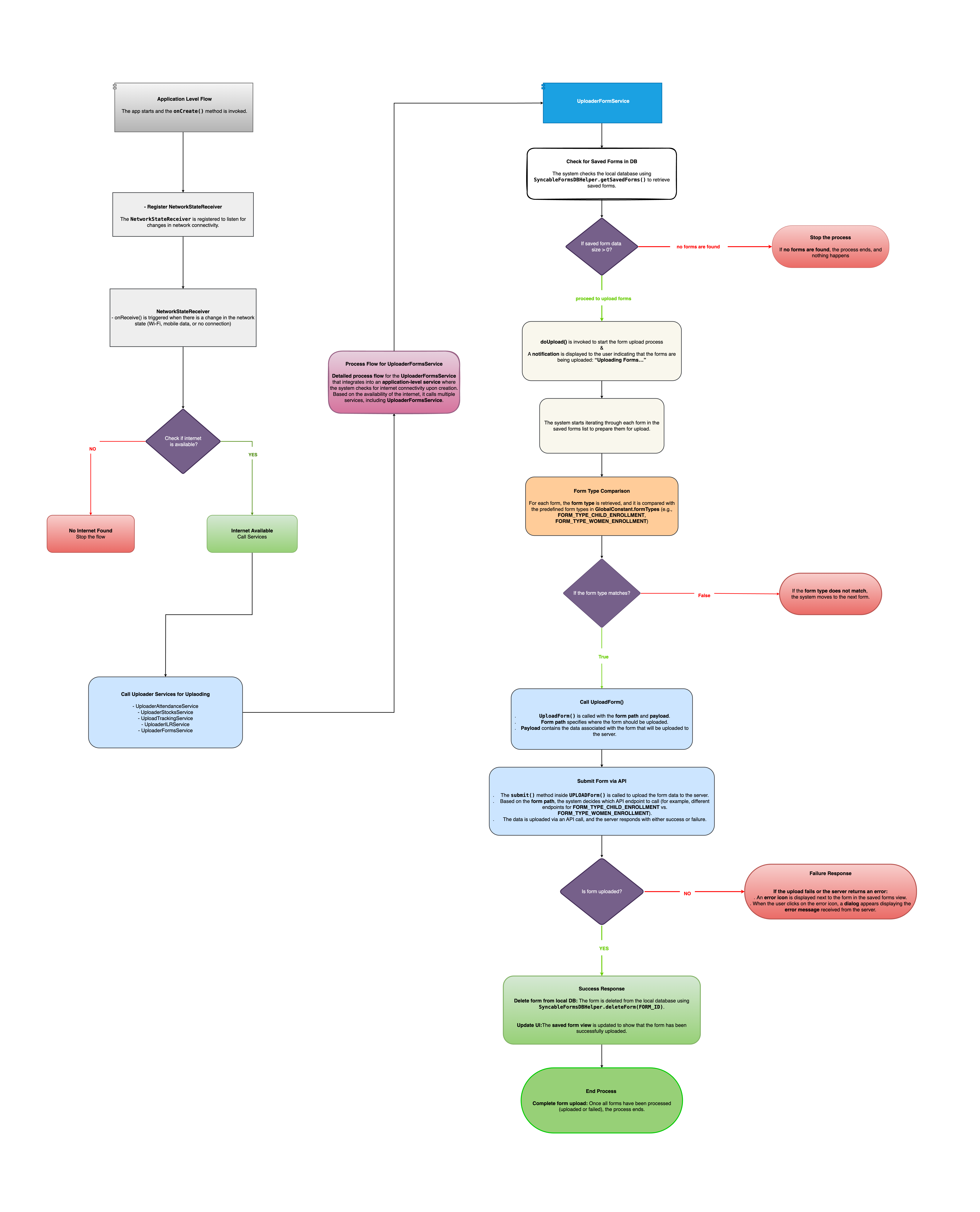
Process Flow of Form Uploader Service (Based on Flowchart)
1: Service Invocation
The Background Service is triggered when:
- The app starts.
- Internet connectivity is restored.
2: Network Check
- The system checks for internet availability.
- If no internet, the process stops.
- If internet is available, it proceeds.
3: Check for Unsynced Forms in Database
- The system searches the local database for saved forms.
- If no forms exist, the process stops.
- If forms are found, it proceeds to upload.
4: Authentication & Authorization
- The system checks authentication credentials.
- If authentication fails, the process stops.
5: Form Type Verification
- The system verifies if the form type is valid.
- If the form type does not match, it is skipped.
6: Upload Process
- The system calls the Upload API to send the form data.
- The API processes and validates the submission.
7: Validation Check & Submission:
- If the form is invalid, an error is logged.
- If valid, it is successfully uploaded.
8: Handling Upload Results
- Successful Upload:
- The form is deleted from the local database.
- The system logs a success message.
- Failure Response:
- If an error occurs, the form is retained for later retries.
- The system logs the failure.
9: Completion Confirmation
- Once all forms are processed, a final completion message is logged.
Flowchart Explanation
The attached flowchart provides a visual representation of the Form Uploader Service:
1: Start: Application-Level Trigger
- The app invokes the background service when internet connectivity is restored.
2: Network Check
- If no internet → Process stops (Red Box).
- If internet available → Proceeds to upload.
3: Database Check for Saved Forms
- If no saved forms found → Process stops.
- If saved forms exist → Continues to the next step.
4: Authentication & Authorization
- The system verifies user credentials.
- If authentication fails, the process stops.
5: Form Type Validation
- Ensures form type matches expected format.
- If incorrect, form is skipped.
6: Uploading Process
- The system sends form data to the server via API.
7: Validation & Submission
- The server validates the form.
- If invalid, an error message is displayed.
- If valid, the form is uploaded.
8: Handling Responses
- Success → Form is removed from local storage.
- Failure → Form remains saved for later retries.
9: Completion Confirmation
- Once all forms are processed, the system logs a completion message.
Flowchart